セールスを増やすならCandy Rack

Candy Rackは、Shopify公式認定アプリ「Built for Shopify」に認められています。
Shopifyストアのパフォーマンスを最大化するために必要な唯一のアップセルアプリです。Candy Rackで2026年を最高の売上年にしましょう。
無料でお試しください

Meet Setpilot: profit analytics for Shopify merchants

Setpilot is our new profit analytics app for Shopify. It combines your real costs with Shopify sales data to show contribution margins (CM1–CM4), product-level profitability, and where money is actually leaking — in real time.

Meet Setpilot: profit analytics for Shopify merchants

After months of building and testing with a handful of merchants, we're rolling out our newest app on the Shopify App Store: Setpilot. It's a profit analytics tool that does one thing well — it tells you whether the orders you're celebrating are actually making you money.

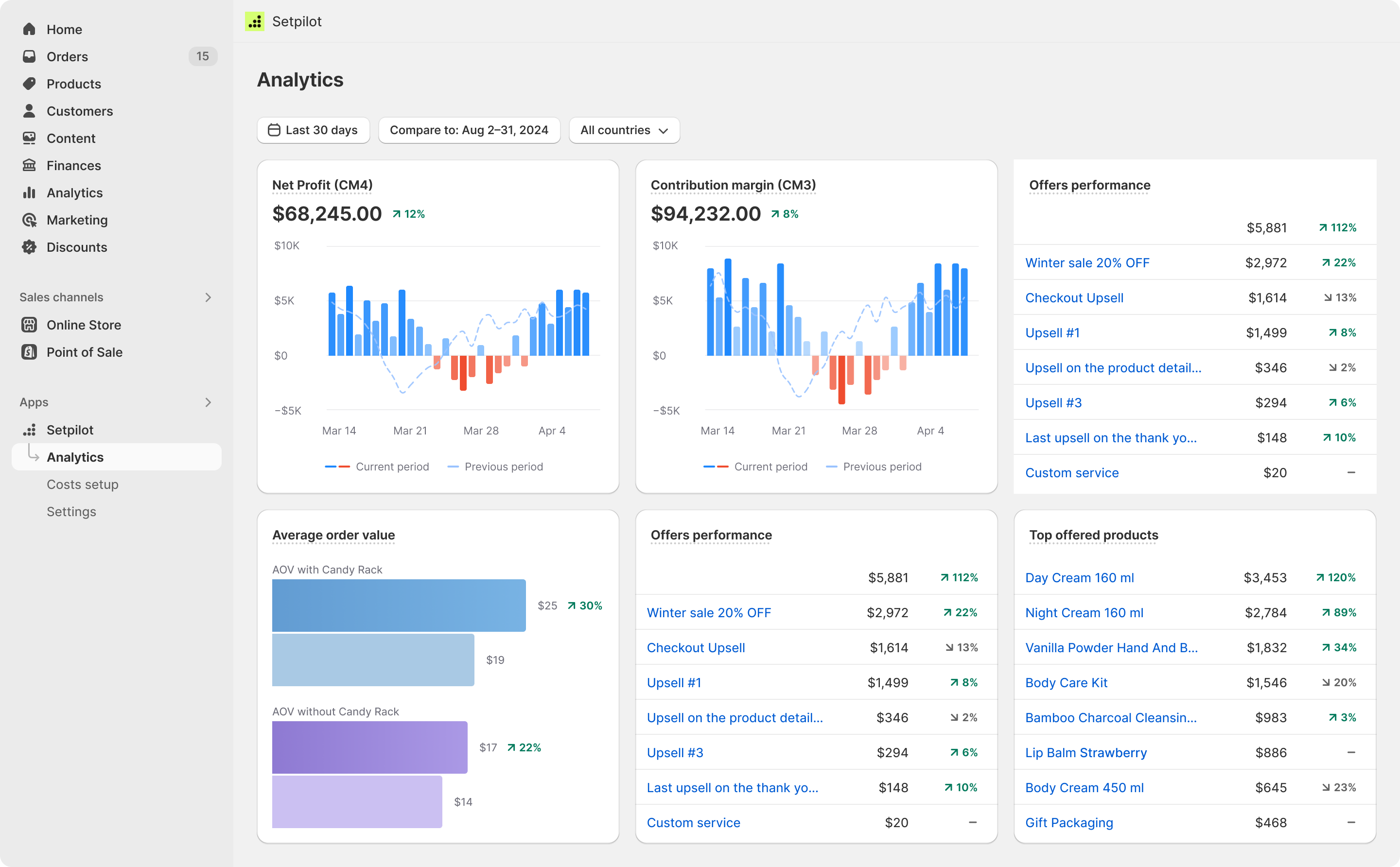
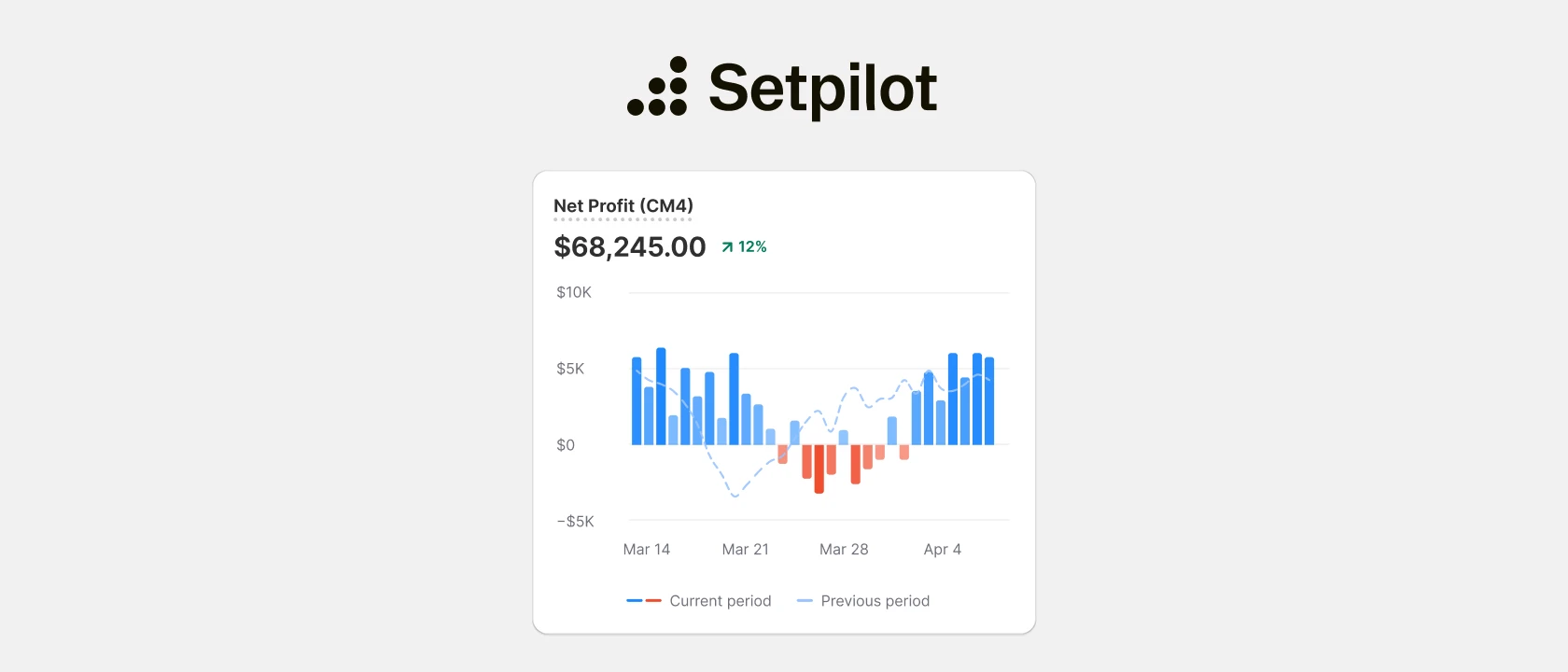
Setpilot analytics dashboard

Shopify's native reporting shows you revenue, units sold, and a long list of marketing metrics. What it doesn't show you, with any real accuracy, is profit. The moment you start factoring in COGS, shipping, payment fees, ad spend, fulfillment, and the dozens of smaller costs that sit between gross sales and the number in your bank account, the Shopify dashboard runs out of road. That's the gap Setpilot fills.

What Setpilot actually does

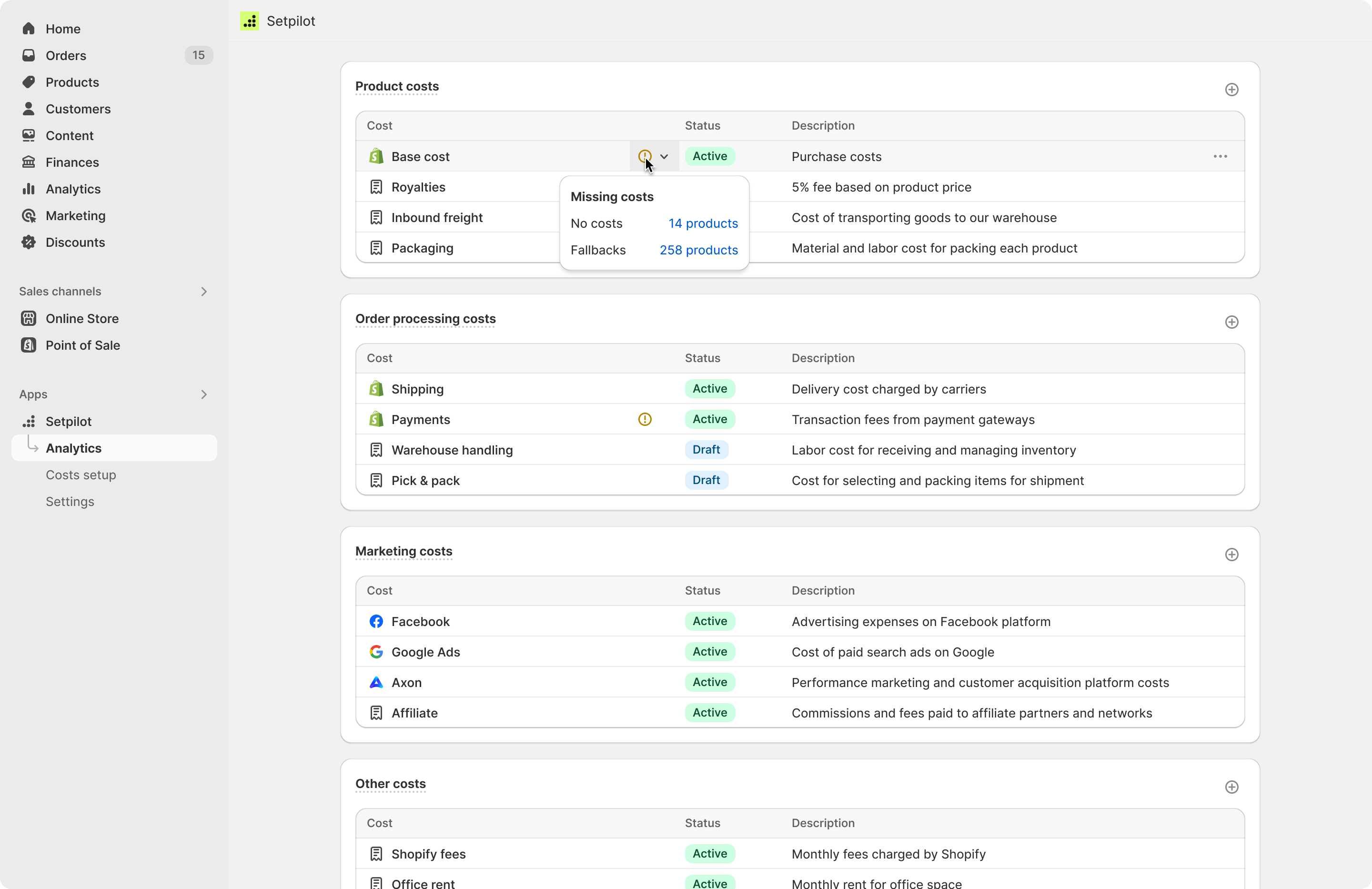
At its core, Setpilot pulls your Shopify sales, products, and inventory data together with the costs you feed it — COGS, shipping, ad spend, transaction fees, fulfillment, anything else relevant to your P&L — and produces a real-time view of your profit by store, product, order, country, and time period.

The headline output is a contribution margin breakdown across four levels: CM1 through CM4. If you've never structured your P&L this way, the short version is:

  • CM1 strips out the direct cost of the goods you sold.
  • CM2 layers in variable order costs — payment fees, shipping, fulfillment, returns.
  • CM3 brings in marketing spend, so you can see profit after Facebook and Google ads have taken their cut.
  • CM4 adds your fixed operating costs to land you at true net profit.

Most merchants we talk to know CM1 (gross margin) and have a rough feel for CM3 (after-ads margin) based on whatever Excel sheet they're maintaining. Very few have a clean, automatically updated view of all four — and that's where decisions get made or missed.

Built for merchants who already grew past the dashboard stage

Setpilot is aimed squarely at growing Shopify stores and the agencies running them. If your store does a few hundred orders a month or more, and you're making decisions about ad budgets, product mix, pricing, or inventory based on revenue rather than margin, this is the app for you.

It is not another general-purpose dashboard with twenty widgets. We deliberately built it around the questions merchants actually ask in operating reviews:

  • Which products are profitable after ad spend, and which ones look like winners on the revenue report but quietly lose money?
  • What's our real ROAS once shipping, fees, and returns are accounted for?
  • Which customer segments are worth acquiring at our current CAC?
  • Where is inventory tying up cash, and what do we need to reorder before we run out?

Setpilot answers those directly. Net profit, contribution margin, AOV, and order count all live in one view. You can compare periods, filter by country, drill into individual orders or products, and export the data when you need to share it.

The integrations that matter

The biggest source of cost noise for most Shopify merchants is ad spend, so Setpilot syncs directly with Facebook Ads and Google Ads. Once connected, attributed spend flows into your P&L without you exporting CSVs every Monday. We also work with Axon Ads, Meta Ads, and Google Sheets for stores that maintain costs in a spreadsheet today.

AI insights

Costs you can't easily automate — supplier invoices, custom packaging, anything one-off — can be entered manually and categorized into the right contribution margin tier. That manual fallback matters: in our experience, there's always something that doesn't fit a clean API integration, and stores that pretend otherwise end up with a beautiful but inaccurate dashboard.

Ask your data anything

One of the features I'm personally most excited about is Setpilot's MCP integration. If you're using Claude, ChatGPT, or any other AI assistant that supports the Model Context Protocol, you can connect it directly to your Setpilot data and ask questions in plain English:

  • "Which products had the worst CM3 last month?"
  • "How did our blended ROAS compare to the same period last year?"
  • "What's our average order profit by country, weighted by volume?"

No exports, no copy-pasting screenshots into a chat window. The assistant pulls live numbers from your account and answers. For founders and operators who don't want to live inside another dashboard, this is the fastest way I've seen to get real financial answers out of a Shopify business.

Pricing

Setpilot is free to install with a free plan for trial and development stores, and a 14-day free trial on every paid plan. Pricing scales with monthly order volume:

  • Start — $29.99/month, up to 300 orders/month
  • Grow — $79.99/month, up to 1,000 orders/month
  • Pro — $149.99/month, up to 3,000 orders/month
  • Ultimate — $399.99/month, unlimited orders

Every plan includes the full feature set: CM1–CM4 analytics, the P&L dashboard, ad sync, product cost management, order-level profit breakdown, inventory tracking, and 24/7 chat and email support. We're not gating anything behind a higher tier just to push upgrades.

How to get started

Installation takes a few minutes:

  1. Install Setpilot from the Shopify App Store.
  2. Connect your ad accounts (Facebook, Google, Meta, Axon) so attributed spend flows in automatically.
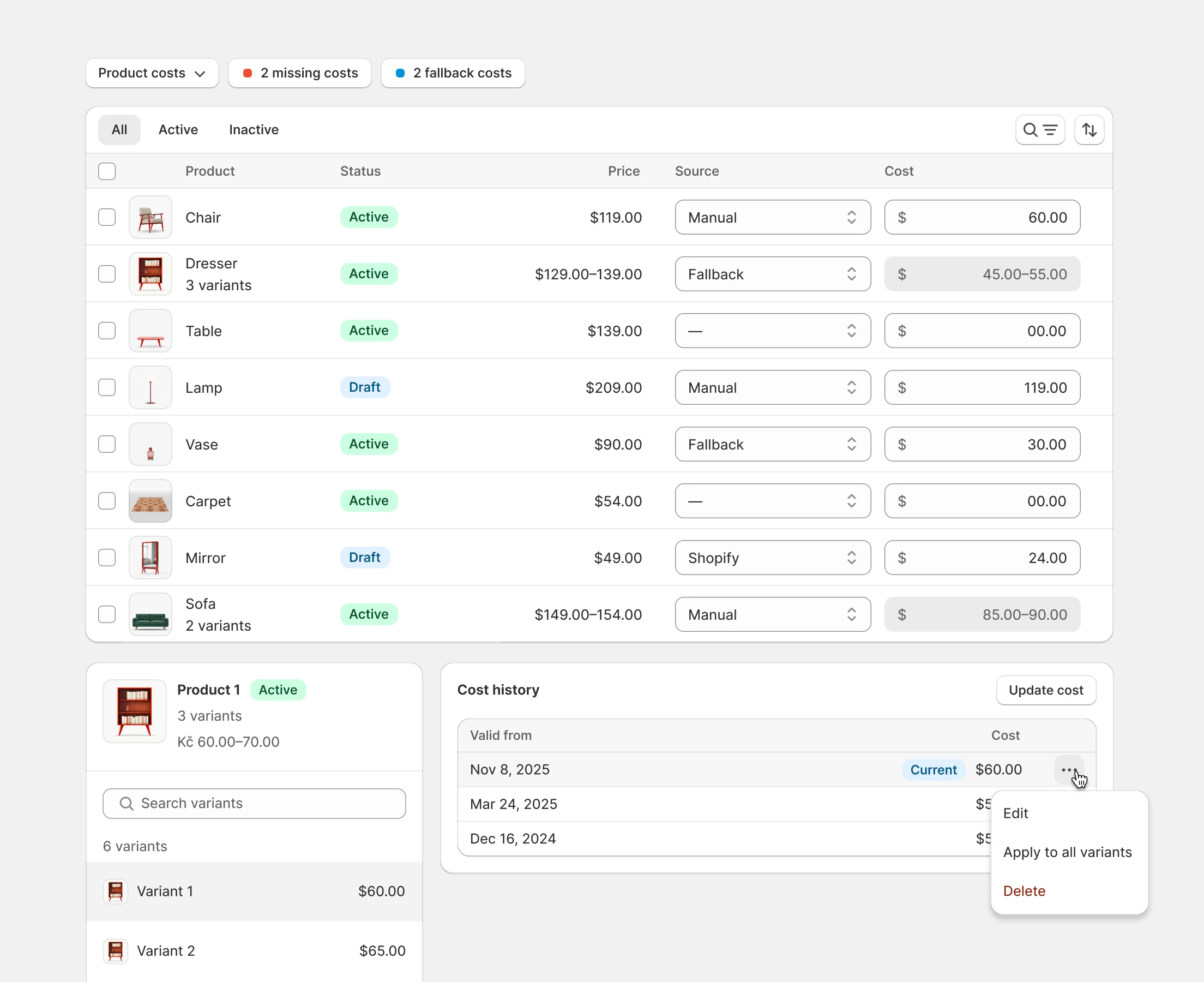
  3. Add your product costs — either by uploading a CSV, importing from Google Sheets, or letting Setpilot pull existing cost-per-item values from Shopify.
  4. Open the dashboard. Your real margins should be visible immediately, including historical data once the import finishes.

If you want help mapping your cost structure into the CM1–CM4 framework, our support team can walk you through it. We've onboarded enough merchants now to have opinions about what belongs where.

Why we built it

At Digismoothie we've worked with thousands of Shopify merchants — most of them via Candy Rack and our other apps — and the single most common pattern we see is stores chasing top-line growth without a clear view of bottom-line health. A Black Friday with record revenue can leave you worse off than a quiet October if your discount stack, ad spend, and returns are working against you. You can't fix what you can't see.

Setpilot is the tool we wanted ourselves: clear, fast, honest about costs, and built specifically for how Shopify stores actually run. If you want to know whether you're profitable — today, not at the end of the quarter — give it a try.

Install Setpilot from the Shopify App Store →

Or read more on setpilot.com.

Shopifyでどこでも販売

Tomas Janu

トムはアップセリング、コンバージョン最適化、eコマースのトレンドについて書くのが大好きです。彼は私たちの共同創設者の一人で、サポートチームに連絡すれば彼と話せることもあります。LinkedInで彼をフォローして、Shopify関連のヒントやニュースをもっとチェックしてください。

私たちはShopifyの公式パートナーであり、紹介手数料を得る場合があることをご承知おきください。

無料で試すキャンディラックプレビュー

最新記事

すべての記事

当社のアプリでShopifyのビジネスを強化しましょう

すべてのアプリは、Shopifyビジネスの成長に役立つように設計されています。アプリをチェックして、無料試用期間を活用してください。

ブーストマイショピファイ