
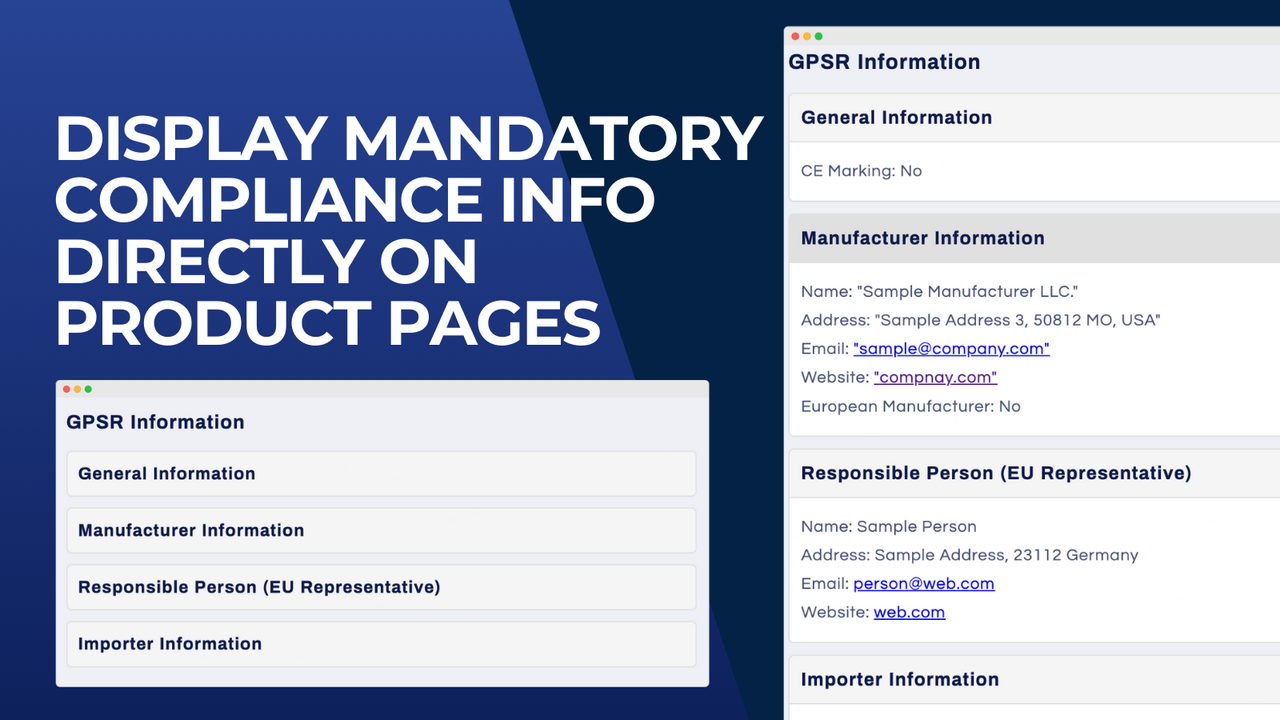
GCM | GPSR Compliance Manager is a Shopify app for organizing and displaying product-safety information related to the EU General Product Safety Regulation. It lets merchants connect manufacturer details, warnings, hazard information, and traceability data to products, then display that information through a storefront widget. The value is not that it writes your product-safety documentation for you. The value is having a workable process for putting reviewed information on product pages and maintaining it across a catalog.
Key features
The app offers a GPSR widget for product pages, multiple widget designs, safety and hazard information, and support for EU languages in the customer-facing block. Its bulk-editing tools are the biggest practical advantage for stores with more than a handful of products. Basic adds unlimited product assignments, advanced bulk editing, a configurable widget without GCM branding, batch tracking, and the full GHS hazard and safety statement set.
Pro adds automated assignments and logic-based updates, plus an option to hide the GPSR widget outside EU countries. That is useful for a catalog where products share manufacturers, categories, or safety data. The app uses product, theme, and Shopify custom-data access to do this work, so it deserves a normal permissions review before installation. GPSR safety information and a customer's right to cancel are separate jobs. If you sell digital goods as well, our EU withdrawal requirement guide explains the latter.
Pricing and trial information
GCM has a free plan with its core GPSR features, basic support, a storefront widget, multiple designs, safety and hazard information, and customer-facing EU-language support. It is useful for proving the setup on a small catalog. GPSR Basic costs $15/month, or $149/year, and GPSR Pro costs $29/month, or $299/year. Basic unlocks the high-volume operational features; Pro adds automatic information assignments, updates by logic, and non-EU widget controls.
The current listing does not advertise a paid-plan free trial. That makes the free plan more important than usual: set up a representative group of products, test the widget in the theme, and check the editorial workflow before you commit to Basic or Pro.
Rating and reviews
At the time of review, GCM has a 4.9 rating from 26 Shopify App Store reviews and is marked Built for Shopify. Merchants regularly praise the responsive support and the ability to get a custom warning or theme integration sorted quickly. The more useful review detail is that some stores found the feature set less than self-explanatory at first, or needed help with an older theme. The support record is reassuring, but the review volume is still small.
Pitfalls
GCM helps manage and surface information. It does not tell you whether your manufacturer details, warnings, hazard statements, batch information, or coverage are sufficient for a particular product and market. You still need reviewed source data and an internal owner for keeping it current. A widget can make missing or incorrect information easier to spot, but it cannot repair it.
Theme testing is also essential. The app has theme access and the widget may need help on an older or customized theme. Check the block on a live-like product template, with variants and translated storefront content. Finally, automated assignments in Pro can save real time, but only after you have clean product types, tags, or other logic to base them on. Automation applied to poor product data only spreads mistakes faster.
Conclusion
I would use GCM when I have a Shopify catalog that needs a repeatable workflow for displaying approved GPSR information, especially if I sell into several EU markets. The free plan is a sensible starting point for small stores. Basic is the practical tier for serious catalog work, while Pro only earns its price when rules-based assignments and country controls replace enough manual maintenance. Treat the app as the delivery and maintenance layer for product-safety data, not as the legal assessment itself.